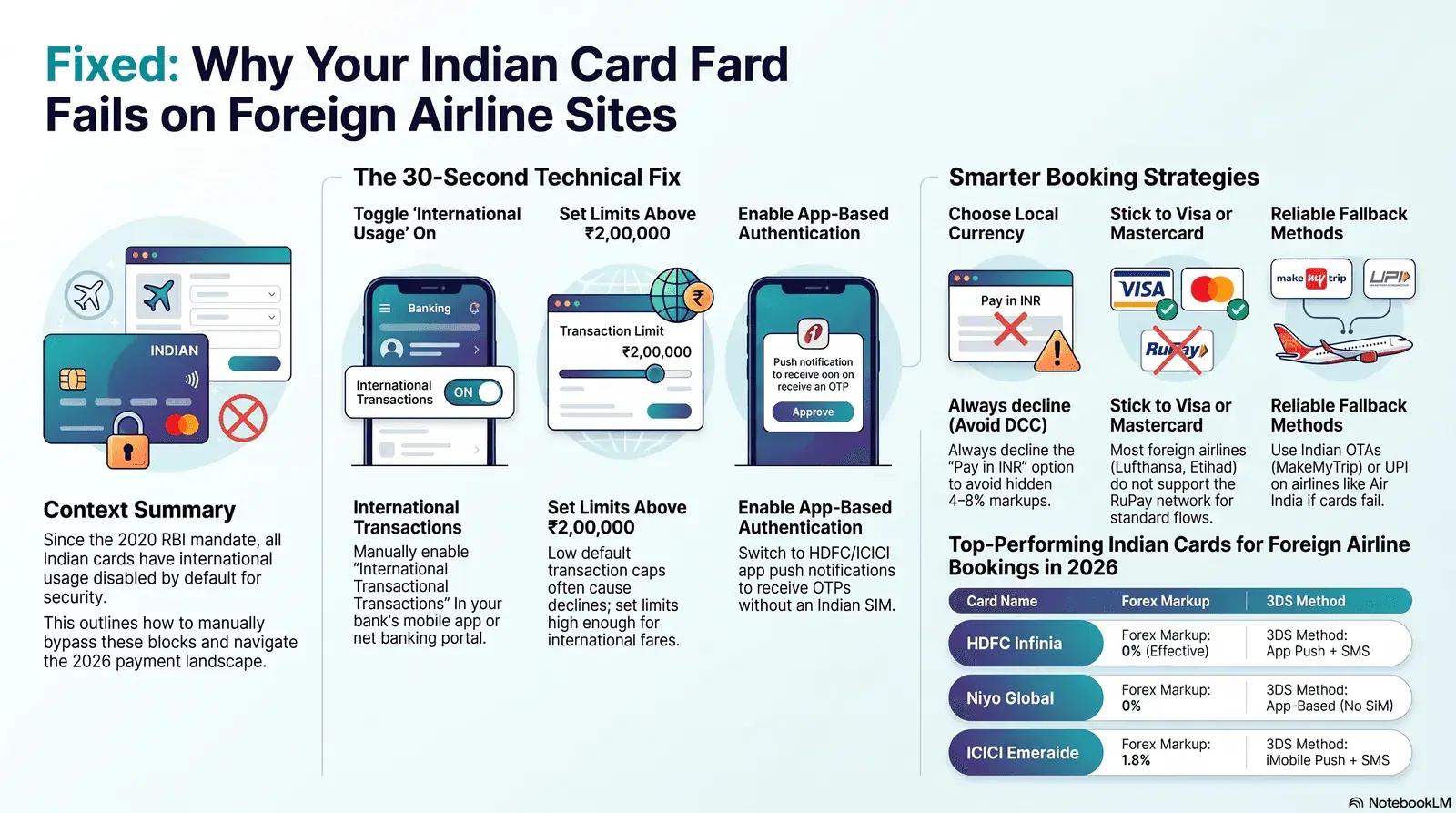
- RBI mandate (16 March 2020): All Indian cards issued or reissued after this date have international usage disabled by default — you must actively switch it on via your bank app or net banking before booking any foreign fare.
- The OTP trap abroad: If you are outside India (or using a foreign SIM), the 3D Secure OTP goes to your Indian number. Enable app-based authentication before you travel, or book from India before departure.
- Best alternative payment paths: If your card still fails, book via Indian OTAs (MakeMyTrip, EaseMyTrip), use UPI on airlines that accept it, or switch to a zero-forex card (Niyo Global) that already has international usage enabled.
In this guide
- The RBI mandate: why your card was disabled
- Step-by-step: enable international usage on HDFC, ICICI, SBI, Axis
- 3D Secure OTP failures — why they happen and how to fix them
- Alternative payment methods when your card still fails
- Which Indian cards work best on foreign airline websites in 2026
- The DCC trap — and how to avoid paying an extra 4–8% on every fare
- Pre-booking checklist: 5 things to do before you try to pay
1. The RBI mandate: why your card was blocked from day one
Since 16 March 2020, the Reserve Bank of India (RBI) requires all banks to issue and reissue cards with international, online, and contactless transactions disabled by default. This was formalised in RBI Circular RBI/2019-20/142 dated 15 January 2020, effective 16 March 2020. Cards that had never previously been used for international or card-not-present transactions were also mandatorily blocked under the same directive.
The rule was introduced as a security measure to protect Indian cardholders from cross-border fraud. Before 2020, a card stolen or skimmed in India could be used internationally with no block in place. The mandate flipped the default: your card is safe unless you explicitly open it up.
"All cards (physical and virtual) issued/re-issued by card issuers shall be enabled for use only at contact-based points of usage [ATMs and PoS within India] by default. For international transactions, online card-not-present transactions, and contactless transactions, customers will have to set up these services explicitly."
The practical result: even a premium HDFC Infinia or Axis Magnus card handed to you at a bank branch will fail on Lufthansa's payment page unless the cardholder has gone into net banking or the mobile app and toggled international usage on. Most cardholders only discover this when a fare expires mid-checkout.
There is no grace period, no automatic exception for premium cards, and no notification from the bank at the point of purchase. The decline message you see on the airline website — "Payment failed", "Transaction not authorised", or "Card not accepted" — gives no indication that the fix is a 30-second setting change in your banking app.
From April 2026, the RBI also mandated two-factor authentication for all digital payments in India, and separately proposed that overseas merchants must support AFA (Additional Factor of Authentication) for Indian card-not-present transactions by October 2026. This will improve cross-border transaction success rates over the coming months, but as of June 2026, the responsibility to pre-enable your card still sits with you.
2. Step-by-step: how to enable international transactions on your card
Enabling international usage on most Indian bank cards takes under two minutes via the bank's mobile app or net banking portal. The change is instant — you can proceed to book your flight immediately after saving. Below are the precise steps for the four most common cards used by Indian travellers booking international flights.
HDFC Bank credit or debit card
Via HDFC Net Banking:
- Log in to HDFC NetBanking.
- Expand the Cards tab and click Request.
- Select Set Card Usage / Limits.
- Click International Usage / Limit, then Continue.
- Toggle international transactions to On, set a daily limit (minimum ₹10,000; we recommend ₹2,00,000 or higher for airline fares), and click Confirm.
Via the HDFC MobileBanking app: Navigate to Cards > Manage Card > International Usage and toggle on.
Via WhatsApp Banking: Message "Card Settings" to 7070022222 and follow the prompts to enable international usage.
ICICI Bank credit or debit card
- Log in and click Cards in the main menu.
- Select your card, then click Manage Card Limits.
- Under International, toggle online transactions to Enabled.
- Set a per-transaction and daily limit, confirm with OTP.
Via iMobile Pay app: Go to Cards > Card Controls > International Transactions and enable.
Via SMS: Send INTL ON to 5676766 from your registered mobile number. You will receive a confirmation SMS within seconds.
SBI credit or debit card
Via SBI NetBanking:
- Log in and go to e-Services > Debit Card Services.
- Click ATM cum Debit Card > ATM Card Limit/Channel/Usage Change.
- Select your account, then choose International Usage and click Enable.
Via YONO app: Navigate to Services > ATM Card Services > Limit/Channel/Usage Change and enable international e-commerce usage.
Note for SBI credit cards: SBI credit cards are managed via the SBI Card portal separately from SBI bank accounts. Log in to SBICard.com and go to My Account > Card Management > International Usage.
Axis Bank credit or debit card
- Log in, click Cards > Debit/Credit Card Services.
- Select Manage Card > Card Controls.
- Toggle International Transactions to on and set limits.
Via Axis Mobile app: Go to Cards > Manage Card > Card Controls > International Usage.
Airline fares from India to Europe can exceed ₹1,00,000 (€1,100) in peak seasons. Set your international limit at ₹2,50,000 or above to avoid the fare being declined mid-checkout because the transaction amount exceeds a low per-day cap. You can always lower it again after booking.
3. 3D Secure OTP failures — the hidden problem abroad
Even after enabling international usage, many Indian cardholders fail at the 3D Secure (3DS) step because the OTP is sent to an Indian mobile number they cannot receive while abroad. This is separate from the RBI usage-enable issue and affects travellers who are already outside India, or who have changed their SIM.
3D Secure is the authentication layer that appears after you enter your card details on an airline website. Indian banks use 3DS to send a one-time password to your registered mobile number. If your Indian SIM is at home, your roaming plan has expired, or you are using a local Irish or UK SIM, that OTP goes nowhere — and the transaction times out.
Why does the version mismatch matter?
Some international airline payment gateways use 3DS 2.0 while some Indian bank back-ends still authenticate via 3DS 1.0, causing a protocol mismatch that results in a silent decline. 3DS 1.0 relies on a redirect to the bank's ACS (Access Control Server) and sends an OTP. 3DS 2.0 supports in-app push notifications and biometric authentication — a smoother experience when your bank supports it.
As of June 2026, HDFC Bank and ICICI Bank have rolled out 3DS 2.0 support on their premium card products (Infinia, Regalia, and Emeralde respectively), allowing push-notification authentication via their apps instead of SMS OTP. SBI Card and Axis Bank still primarily rely on SMS OTP for 3DS authentication as of the same date.
- Call your bank's international helpline and ask them to register your current foreign number as a temporary transaction-notification number.
- For HDFC: ask to switch to HDFC Mobile Banking app push authentication — no SIM needed, works over Wi-Fi or data.
- For ICICI: iMobile Pay app supports app-based OTP for iMobile-registered cards even with no Indian SIM.
- As a last resort, use an OTA (see Section 4) or have a trusted person in India complete the booking on your behalf using their connection.
On-the-Ground Insight: "I was trying to book a last-minute DEL→DUB fare on Emirates from my flat in Dublin. I had my ICICI Sapphire card with international usage enabled, but the 3D Secure page just spun and timed out — no OTP arrived because I'd left my Indian SIM at home. I ended up booking through MakeMyTrip using net banking. The fare was ₹3,200 more, but it worked instantly. After I got back to India, I set up iMobile app authentication — haven't had the problem since." — Priya N., TU Dublin, MSc Data Analytics, 2025 intake
From October 2026, the RBI's new directive requires overseas merchants and acquirers to support AFA (Additional Factor of Authentication) for Indian-issued cards when it is technically requested. This will improve success rates on foreign airline sites — but the deadline is still months away, and implementation will be gradual.
4. Alternative payment methods when your card still fails
If enabling international usage and resolving 3DS issues still does not work, you have several viable alternatives depending on the airline, route, and booking platform.
Book via Indian OTAs
Indian OTAs (MakeMyTrip, EaseMyTrip, Yatra, Cleartrip) act as intermediaries between your Indian payment method and the airline's inventory. They accept Indian net banking, UPI, domestic debit cards, EMI, and wallets — bypassing the international transaction requirement entirely.
The trade-offs: OTAs charge convenience fees (₹150–₹600 per booking on most platforms), and under DGCA's new Customer Assistance Regulations (effective 26 March 2026), the 48-hour cancellation look-in window is only available on direct airline bookings, not OTA purchases. Still, for a one-off international booking where your card is failing, an OTA is the most reliable fallback.
UPI on select airline sites
UPI is increasingly accepted on Indian airline websites for international routes booked on the Indian version of the site. As of June 2026, Air India and Emirates India accept UPI on their Indian booking pages. The per-transaction UPI limit set by NPCI for most banks is ₹1,00,000 per transaction, which covers many India–Ireland fares outside peak season. Above this, you will need card or net banking.
Net banking (NEFT/IMPS via OTA)
Most OTAs support net banking as a payment method, routing through the bank's own 2FA flow rather than the 3DS pathway. This avoids OTP delivery to foreign numbers and has a higher success rate for high-value transactions. Net banking via OTAs does not require international usage to be enabled on your card.
Third-party forex cards (Niyo Global, BookMyForex)
A Niyo Global card (issued on SBM Bank Visa platform) comes with international usage pre-enabled and zero forex markup. It works on all major foreign airline websites and does not require a separate usage-enable step. The card is free to apply for and takes 3–5 business days to receive. One limitation: it is a debit card, so your spend is limited to your preloaded balance.
5. Which Indian cards work best on foreign airline websites in 2026?
The best Indian cards for foreign airline websites in 2026 combine reliable international 3DS authentication, low forex markup, and high per-transaction limits. Visa and Mastercard network cards consistently outperform RuPay on international acceptance.
| Card | Network | Forex Markup | 3DS Method | International Limit (default) | Best For |
|---|---|---|---|---|---|
| HDFC Infinia | Visa Infinite | 0% (with Global Value Programme cashback) | App push + SMS | Up to card limit | Premium card with best reward rate (3.3% on intl spend) |
| IndusInd Avios Visa Infinite | Visa Infinite | 1.5% | SMS OTP | Up to card limit | Qatar Airways & British Airways Avios earn (6 Avios per ₹200) |
| Axis Atlas | Visa Infinite | 2% | SMS OTP / App | Up to card limit | Flexible miles card; note Apr 2026 devaluation on Qatar transfers |
| ICICI Emeralde | Visa Infinite | 1.5% | iMobile push + SMS | Up to card limit | Emirates Skywards earn; iMobile app-auth useful abroad |
| Niyo Global (SBM Bank) | Visa | 0% | App (no SIM needed) | Preloaded balance | Zero-forex debit card; works on any foreign airline site out of the box |
| HDFC Regalia Gold | Visa Signature | 2% | SMS OTP / App | Up to card limit | Mid-tier card; solid acceptance; enable intl use before booking |
Sources: Paisabazaar HDFC Infinia, CardInsider Axis, GoNiyo travel cards — June 2026.
RuPay is accepted at domestic merchants and a limited set of international partners via the DISCOVER and JCB interoperability agreements. However, most foreign airline websites (Lufthansa, British Airways, Etihad) do not accept RuPay in their standard payment flows. Use a Visa or Mastercard network card for any international airline booking.
6. The DCC trap — avoid paying an extra 4–8% on every fare
Dynamic Currency Conversion (DCC) is a payment option offered by foreign airline websites that lets you pay in Indian Rupees instead of the airline's local currency — but the exchange rate used includes a hidden markup of 4% to 8% above the interbank rate. Accepting DCC effectively adds thousands of rupees to your fare with no additional benefit to you.
Here is how it works in practice: you are booking a DEL→LHR fare on British Airways' Indian site. At checkout, you see two options: "Pay in GBP £780" or "Pay in INR ₹88,420." The INR amount looks convenient because it's known upfront — but the bank's mid-market rate for £780 would be approximately ₹82,600. The DCC provider has added a ₹5,820 (7%) markup that goes to the airline/acquirer, not to you.
True Cost = Base Fare + DCC Markup (if you accept INR) + Bank Forex Markup Fee
Example: a DEL→DUB fare at £820 in June 2026. If you pay in GBP with a 2% forex markup card: £820 × ₹107 = ₹87,740 + ₹1,755 (2% fee) = ₹89,495 total. If you accept DCC and pay in INR at the offered rate of ₹1,14 per GBP (typical DCC rate): ₹93,480 total — a ₹3,985 difference on a single booking. With a zero-forex card like Niyo Global, the cost drops to ₹87,740 — saving nearly ₹6,000 vs. DCC.
Always choose to pay in the airline's local currency. The DCC option is always presented as the more "transparent" choice because you see the INR amount upfront, but it is always more expensive. Your bank's conversion will be better.
Many international airlines show different fares depending on which regional site you use. Lufthansa's India site in INR may show a different fare than the Germany site in EUR for the exact same flight. Use a Visa or Mastercard zero-forex card on the lower-priced regional site, pay in the local currency, and you access both price arbitrage and currency savings simultaneously.
7. Pre-booking checklist: 5 things to do before you try to pay
Completing these five steps before you open an airline website will eliminate 95% of Indian card failure scenarios on foreign airline booking pages.
Enable international transactions in your bank app or net banking — set limit ≥ ₹2,0,000
Confirm your registered mobile number is active and can receive OTPs (or enable app-based auth)
Use a Visa or Mastercard — never RuPay for foreign airline sites
At checkout, always choose to pay in the airline's local currency — decline the INR (DCC) option
The fifth step is timing: complete the steps above before you search for fares, not during checkout. Fare prices are not locked while you are in the settings app. Many travellers lose a fare because they started the process after seeing the price and the fare expired or changed during the 5–10 minutes spent enabling card features.
If you are travelling to Ireland or the UK for studies or work, also consider getting a Niyo Global card or a BookMyForex multi-currency card before departure. These are designed for exactly this use case: zero-forex, international usage pre-enabled, no dependence on Indian SMS OTP.
One con to note: Niyo Global is a debit card and requires preloading. It does not provide credit (no interest-free period). BookMyForex cards are prepaid forex cards — good for known spend but require currency to be loaded in advance at a locked rate. Neither earns rewards points in the same way a premium credit card does.
Frequently Asked Questions
Why is my Indian credit card getting declined on foreign airline websites?
Since 16 March 2020, the Reserve Bank of India mandated that all newly issued Indian cards have international and online usage disabled by default. Cards that had never previously been used for international transactions were also mandatorily disabled. You must explicitly enable international usage via your bank's app or net banking portal before attempting any foreign purchase.
How do I enable international transactions on my HDFC credit card?
Log in to HDFC Net Banking, go to Cards > Request > Set Card Usage/Limits > International Usage/Limit, and click Confirm. Alternatively use the HDFC app under Cards > Manage Card > International Usage. The change is instant and you can book flights immediately after.
My OTP never arrives when paying on a foreign airline website - why?
If you are outside India or using a different SIM, the OTP sent to your registered Indian mobile number will not reach you. Contact your bank to enable app-based authentication (push notification or TOTP) instead of SMS OTP, or ensure international roaming is active on your registered number. From October 2026, RBI's new AFA mandate will require overseas merchants to support Indian 3DS authentication - until then, the OTP issue is a known pain point.
What is Dynamic Currency Conversion (DCC) and how do I avoid it on airline websites?
DCC is when a foreign airline website offers to charge your card in Indian Rupees (INR) rather than the airline's local currency. The rate used typically includes a 4-8% markup above the interbank rate. Always choose to pay in the airline's local currency (USD, EUR, GBP, AED) and use a zero-forex card to avoid both the DCC spread and bank forex fees.
Find the cheapest fares for your India–Ireland route
Compare live fares across Lufthansa, Emirates, Qatar Airways, Air India, and Etihad — pay with the right card and save thousands.
All information in this guide is based on publicly available official sources as of June 2026, including RBI circulars, bank help centre documentation, and NPCI guidelines. Bank app navigation paths may change with software updates. Always verify current card settings and limits directly with your card issuer. MyFlightOffers is not affiliated with any bank, card issuer, or airline mentioned in this article. This article does not constitute financial advice.
- NEW Card Tokenisation for Flight Bookings India 2026 — How RBI's token mandate affects saved cards on MakeMyTrip, Yatra, and airline apps
- Transfer Credit Card Points to Airline Miles India 2026 — HDFC → KrisFlyer, Amex → Avios, Axis → InterMiles transfer ratios and strategies
- HDFC Credit Card Flight Offers 2026 — Current discounts, cashback offers, and milestone bonuses on HDFC cards for flight bookings
- PhonePe Flight Booking Guide 2026 — Book domestic and international flights via PhonePe, payment methods and rewards
- Indian Card Declined on Foreign Airline Website? Step-by-Step Fix (2026) — Indian card declined on Emirates, Qatar or Etihad? Fix it in 3 steps: enable international use, call your bank, or book via an Indian OTA. RBI 2FA rules explained.
- NRE and NRO Accounts for International Flight Bookings: Indian NRIs in Ireland (2026) — NRE vs NRO accounts for booking Dublin-India flights 2026: repatriation rules, OCI access, LRS/TCS, blocked card fixes and zero-forex card options.