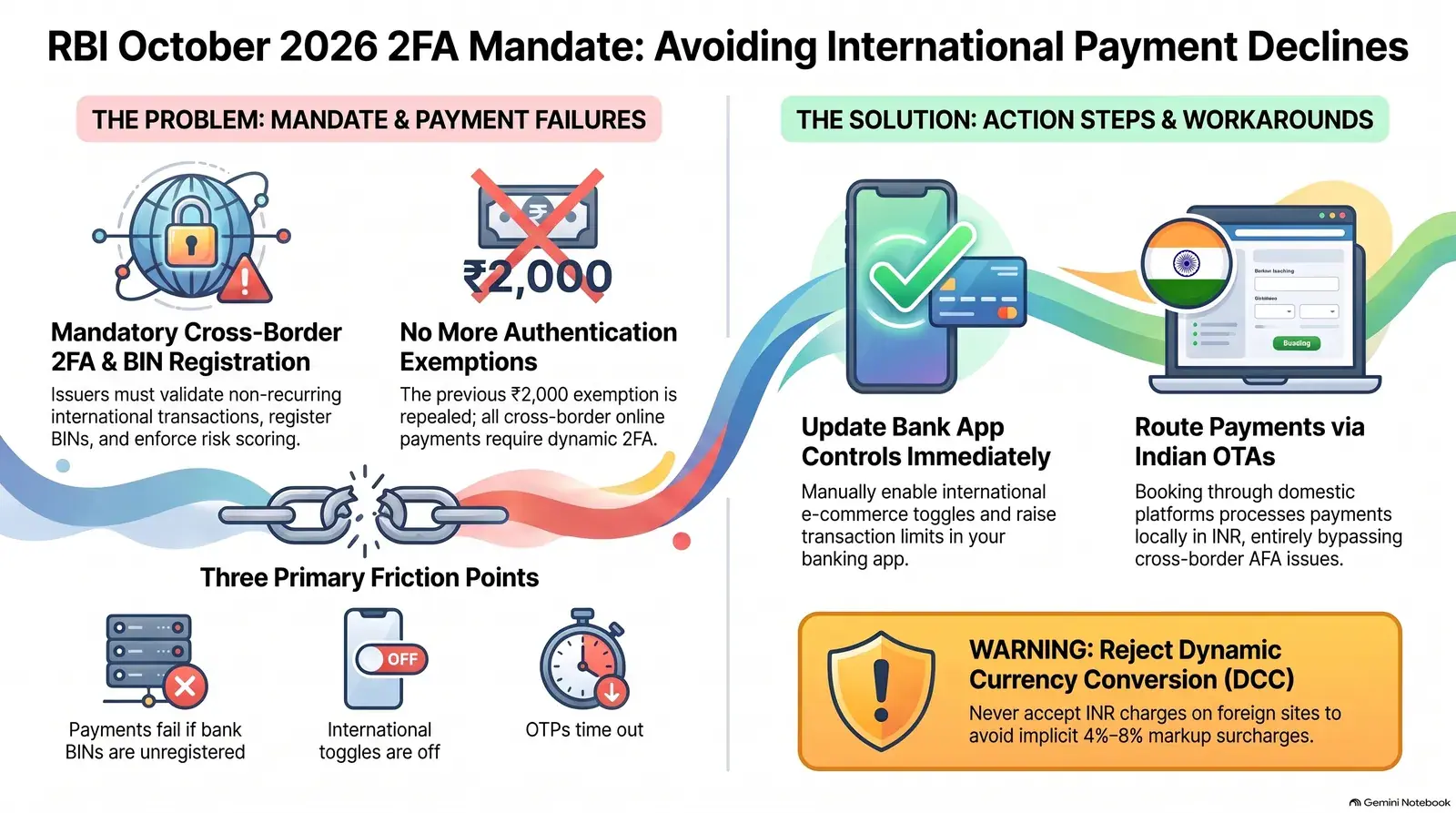
- The October 1 deadline is live: The RBI's Authentication Mechanisms for Digital Payment Transactions Directions, 2025 (circular RBI/2025-26/79, 25 September 2025) require card issuers to implement AFA for international card-not-present transactions and register BINs with card networks by 1 October 2026.
- Your card may still be declined if you haven't checked settings: Indian banks keep international transactions disabled by default. Even with the mandate live, OTP delivery to an Indian mobile number can fail on foreign airline sites. Verify your card's international flag in your bank app now.
- There are reliable workarounds: Book via MakeMyTrip or EaseMyTrip (both carry Emirates, Qatar, Etihad) in INR, use a zero-forex card like Federal Bank Scapia, or pay with UPI on an Indian OTA.
1 October 2026 (cross-border CNP & BIN registration)
1 April 2026 (all domestic digital payments)
REPEALED — December 2016 circular now cancelled
Book via Indian OTA in INR (MakeMyTrip / EaseMyTrip)
What does the RBI October 2026 mandate actually require?
The RBI's "Authentication Mechanisms for Digital Payment Transactions Directions, 2025" (circular RBI/2025-26/79, issued 25 September 2025) set two compliance dates: 1 April 2026 for all domestic digital payments, and 1 October 2026 for international card-not-present (CNP) transactions specifically. As of today, both deadlines are live.
The Directions introduce three core obligations for every card issuer in India under the cross-border CNP clause:
- Validation mechanism: Card issuers must have a system to validate non-recurring cross-border CNP transactions when an overseas merchant or acquirer requests authentication. This is what triggers the OTP or alternative dynamic factor on your phone when you try to pay on Emirates.com or Qatar Airways.
- Risk-based mechanism: Banks must implement risk scoring for all cross-border CNP transactions, including recurring ones such as subscriptions. The Directions do not prescribe the risk signals; in practice issuers look at things like location, device, spend pattern and transaction history.
- BIN registration: Card issuers must register their Bank Identification Numbers (BINs — the first 6–8 digits of your card) with the card networks (Visa, Mastercard, RuPay) so that an authentication request raised by an overseas merchant or acquirer can be routed back to your Indian bank. If a BIN is not registered, the foreign airline's payment gateway may have no way to trigger your bank's OTP step.
The Directions define authentication factors under three categories: "something the user knows" (PIN, password, passphrase), "something the user has" (card hardware, software token, SMS OTP), and "something the user is" (fingerprint, facial recognition, Aadhaar biometrics). At least one factor must be dynamically created or proven — meaning it must be unique to that specific transaction. An SMS OTP satisfies this. A saved static password alone does not.
How does it affect your Indian card on Emirates, Qatar and Etihad?
When you enter your Indian card details on a foreign airline website, the airline's payment gateway sends a 3D Secure authentication request to your card network, which routes it to your Indian bank — and this is exactly where the new mandate creates friction. The process depends on whether three conditions are all true simultaneously: your bank has registered its BINs, your card has international transactions enabled, and your Indian mobile number is reachable for OTP delivery.
If all three conditions are met, the experience is seamless: you enter card details, an OTP arrives on your Indian number within seconds, you enter it, and the booking confirms. If any one of the three fails, the transaction declines — often with a generic "payment failed" error that gives no indication of which step broke.
The specific failure modes differ by scenario:
- BIN not registered: The overseas payment gateway cannot locate your bank to route the authentication request. The gateway either silently declines the transaction or shows a generic "authentication failed" message. This is a bank-side issue the cardholder cannot fix themselves — the bank must complete BIN registration with Visa, Mastercard, or RuPay.
- International transactions disabled: Your bank blocks the transaction at its own fraud filters before any authentication attempt is made. This is the most common issue and is entirely within your control to fix right now via your bank's mobile app or net banking.
- OTP delivery failure: Your Indian SIM is on roaming in Ireland, the OTP arrives late or not at all, the authentication window expires, and the payment gateway rejects the session. This affects cardholders who use an Irish SIM full-time and have an Indian number that receives OTPs only on a secondary device or a number that has been inactive.
- Per-transaction international limit too low: Many cards carry a default international limit, set by the bank and the card variant, that is lower than a Dublin–India return fare. The transaction is blocked not because of authentication failure but because it exceeds the card's international spend cap.
In the Regulator's Words: "In order to provide a similar level of safety for online international transactions using cards issued in India, it is proposed to enable AFA for international card-not-present (online) transactions as well." — Reserve Bank of India, Statement on Developmental and Regulatory Policies, 7 February 2025
How do you enable international usage at each bank?
All major Indian banks disable international card usage by default, as required by RBI security guidelines, and require cardholders to opt in explicitly before any cross-border transaction can succeed. Below are the steps for seven banks commonly held by Indian students and NRIs in Ireland.
HDFC Bank
International transactions on HDFC credit and debit cards are enabled through the HDFC Bank Mobile Banking App. Open the app, go to Menu → Cards → Debit/Credit Card Settings → Customise, and toggle "International Usage" to On. Confirm with the OTP sent to your registered Indian mobile number. Changes take effect immediately. Additionally, under the same menu, verify your "International Transaction Limit" — the default depends on the card variant and is often below the price of a long-haul ticket. For a Dublin–India fare of ₹70,000–₹1,20,000, raise the limit above the fare before you start the booking.
ICICI Bank
ICICI Bank allows international transaction activation through Net Banking, the iMobile Pay app, and SMS. Via Net Banking: log in, go to Customer Service → Service Requests → Bank Accounts → Debit Card Related, then select "Manage Debit Card Usage" and enable the "International" toggle. Via iMobile Pay: go to Cards → Credit/Debit Card → Card Controls → International Transactions. Authenticate with your iMobile PIN and an OTP. The change is instant. For credit cards, also check the international transaction limit under "Modify Credit Card Limits."
State Bank of India (SBI)
SBI international card activation requires Net Banking access and takes approximately two minutes. Log in to OnlineSBI, navigate to E-Services → ATM Card Services → ATM Card/Limit/Channel/Usage Change. Select "Change Usage" and choose "International Usage" under the applicable card. Enter the OTP sent to your registered mobile. Note that the default international limit on entry-level SBI debit cards is usually well below an international fare — check the figure shown for your card and raise it under "ATM Card Limit Change" in the same menu.
Axis Bank
Axis Bank international transaction controls are available in both Internet Banking and the Axis Mobile app. In Internet Banking: go to Services → Debit Card Services → select your card → More Services → Manage Usage, then toggle International to On and confirm. In Axis Mobile: go to Cards → Card Controls → International Usage. You will be prompted for an OTP. For credit cards on Axis Bank, the same toggle exists under Cards → Credit Card Controls.
Kotak Mahindra Bank
Kotak's card controls are accessible in real time through the Kotak Mobile Banking App. Navigate to Service Requests → Debit Card → Card Control → select your card number → International/Domestic Controls, then switch International Usage to On for e-Commerce transactions specifically (as opposed to only in-store POS). Also check that "International E-Com" is enabled — this is a separate toggle from "International ATM" on some Kotak cards and is the one required for online flight bookings.
Yes Bank
Yes Bank international card settings are managed through the YES MOBILE app and the Yes Bank Net Banking portal. In YES MOBILE: navigate to Cards → Card Preferences → International Transactions and enable for the relevant card. Via Net Banking: go to Service Requests → Debit Card → International Usage. For Yes Bank credit cardholders, including the YES Marquee (which has a 1% forex markup — useful for international bookings), check that the card's international e-commerce limit is set above the fare you intend to pay.
IDFC FIRST Bank
IDFC FIRST Bank card controls are accessible via the IDFC FIRST Bank mobile app under Cards → Credit Card → Card Controls → Manage. Toggle "International Transactions" on and confirm with the app PIN. IDFC FIRST Bank credit cards carry a lower forex markup than the 3.5% charged by most Indian cards — 1.5% on FIRST Wealth and 1.99% on FIRST Select — worth noting if you want to book directly on a foreign airline site after enabling international usage.
Which setting do you need to change at each bank?
Use this table to identify the exact setting you need to enable before attempting a cross-border airline booking.
| Bank | Where to enable | Limit to check before booking | Special note |
|---|---|---|---|
| HDFC Bank | Mobile Banking App → Cards → Customise → International Usage | International transaction limit (varies by card variant) | Raise limit separately before high-value booking |
| ICICI Bank | iMobile Pay → Cards → Card Controls → International Transactions | Full credit limit (credit card) | Net Banking also works; credit card limit auto-applies |
| SBI | OnlineSBI → E-Services → ATM Card Services → Change Usage | International daily limit (low on entry-level debit cards) | Raise the daily limit separately under ATM Card Limit Change |
| Axis Bank | Axis Mobile → Cards → Card Controls → International Usage | Full credit limit (credit card) | Separate toggle per card type (debit vs. credit) |
| Kotak Mahindra | Kotak Mobile → Service Requests → Debit Card → Card Control | International e-commerce limit (set per card) | Enable "International E-Com" specifically, not just "International ATM" |
| Yes Bank | YES MOBILE → Cards → Card Preferences → International Transactions | Depends on card tier | YES Marquee has 1% forex markup; check e-commerce limit |
| IDFC FIRST | IDFC FIRST App → Cards → Credit Card → Card Controls → Manage | Full credit limit (credit card) | Forex markup 1.5% (FIRST Wealth) or 1.99% (FIRST Select) |
Why do OTPs fail on foreign airline sites, and how do you prepare?
The most common reason Indian cardholders experience failed payments on foreign airline websites is OTP delivery latency or non-delivery — not a refusal to authenticate — and the authentication window expires before the OTP arrives. This problem is particularly acute for Indian students and NRIs in Ireland who use an Irish SIM as their primary number and keep their Indian number as a secondary number on a dual-SIM phone or on a separate device.
Here are the five most common OTP failure scenarios and their fixes:
- Indian SIM on roaming: OTPs sent to an Indian number on international roaming can be delayed because they route through the home network before being forwarded internationally. Airline payment gateways expire the 3D Secure session after a short, fixed window. Fix: keep your Indian SIM active (not just roaming-enabled but actively receiving messages) and test an OTP delivery before attempting a high-value booking.
- Indian number inactive or ported: If you have not used your Indian number for voice calls or SMS in around 90 days, your operator may have deactivated the number for non-usage. OTPs sent to this number will never arrive. Fix: dial a domestic Indian call or receive a call on your Indian number at least once every 60 days.
- eSIM without SMS capability: Some eSIM profiles issued for data-only international use (such as Airalo or Holafly) do not receive SMS. If your Indian number is configured as an eSIM data plan, it will not receive OTP messages. Fix: use a physical SIM for your Indian number, or use an eSIM profile that explicitly includes SMS capability. Our Yesim eSIM review covers travel data and virtual-number options if you want to keep your Indian SIM free for OTPs.
- Browser popup blocker: Some airline checkouts open the 3D Secure authentication in a popup window. If your browser is blocking popups, the authentication window never appears, the session times out, and the payment fails. Fix: allow popups for the airline's domain before checkout.
- Gateway timeout shorter than your bank's OTP delivery: The RBI Directions do not set a response-time window for issuers. If the overseas merchant's gateway times out before your bank generates and delivers the OTP, the transaction declines even if the OTP eventually arrives. Fix: if this happens twice on the same card, stop retrying and use one of the alternative routes below.
Which payment routes bypass the problem?
The simplest and most reliable way to avoid all cross-border CNP authentication issues when booking Emirates, Qatar Airways or Etihad from Ireland is to book through an Indian OTA in INR — both MakeMyTrip and EaseMyTrip sell all three airlines. When you pay on an Indian OTA in INR, the transaction is processed through an Indian payment gateway, your standard domestic 2FA (enabled since 1 April 2026) applies, and there is no cross-border CNP authentication required at all.
Three tiers of alternatives, in order of convenience:
Tier 1: Indian OTAs in INR
MakeMyTrip and EaseMyTrip are Indian payment-gateway-routed platforms that carry Emirates, Qatar Airways and Etihad inventory. Booking through either platform means the payment is processed as a domestic INR transaction from an Indian-registered merchant, your existing domestic card settings apply, and you can use UPI as a payment method if you prefer. Both OTAs also run rotating Indian bank card offers on international flights; the participating banks and discount caps change month to month, so check the offers page on the day you book. The trade-off is that you must have an Indian credit or debit card or an active UPI setup linked to an Indian bank account.
Tier 2: Zero-forex credit or debit cards with good OTP delivery
If you prefer to book directly on the airline's website for fare class control or loyalty points accrual, use a card with zero or very low forex markup and verify OTP delivery before checkout. The best options in 2026 for this use case:
- Federal Bank Scapia Credit Card — zero forex markup and lifetime free. The OTP goes to your registered Indian number. Con: international transactions earn no Scapia Coins, so a booking on a foreign airline site saves the markup but earns no rewards.
- Niyo Global DCB Card — zero forex markup debit card, instant digital issuance, works at Visa merchants globally. The OTP mechanism is the same as any Indian debit card. Con: you must load the card before use; large transfers require NEFT/IMPS from your Indian bank account.
- YES Bank Marquee Credit Card — 1% forex markup (the lowest among super-premium Indian credit cards), unlimited international lounge access. Useful if you book business class or premium economy where the forex saving is meaningful. Annual fee ₹9,999. Con: the markup, while low, is not zero.
Tier 3: UPI on Indian OTAs
UPI on Indian OTAs processes the full international fare in INR through the Indian payment infrastructure, meaning no forex conversion or cross-border CNP authentication occurs at all. UPI works on MakeMyTrip and EaseMyTrip for flight bookings, including international flights. The standard UPI cap is ₹1,00,000 per transaction; for travel merchants NPCI has allowed up to ₹5 lakh per transaction since September 2025, though your bank or UPI app may apply a lower limit. If the fare exceeds your limit, pay by card or net banking on the same OTA instead. Note: UPI cannot be used directly on Emirates.com, Qatar Airways, or Etihad — only on Indian OTAs.
What is the DCC trap, and why should you never pay in INR on a foreign airline website?
Dynamic Currency Conversion (DCC) is a payment trap where a foreign airline website or payment gateway offers to charge your Indian card in Indian Rupees (INR) instead of the airline's base currency (USD, EUR, GBP, or AED) — and the exchange rate used typically includes a 4% to 8% markup above the mid-market rate. This means you pay more than if you had let your bank convert the currency at Visa or Mastercard's interbank rate.
Always select "Decline" or "Pay in [local currency]" when this option appears. If the DCC prompt is the only option visible, use an Indian OTA instead, where the pricing is already in INR at a contracted rate without a DCC surcharge.
True Cost = Base Fare (airline's local currency) + Forex Markup Fee + Any DCC Surcharge (avoid by paying in local currency)
One cost you do not need to add: TCS (Tax Collected at Source) does not apply to a standalone air ticket, whichever of these routes you pay by.
Illustrative example: a Dublin–Mumbai return on Emirates priced at EUR 680 is about ₹74,800 at an illustrative mid-market rate of ₹110 per euro. If the checkout offers DCC at ₹80,000, you are effectively paying a 7% DCC surcharge. By selecting "Pay in EUR" on a zero-forex card such as Scapia, your true cost is about ₹74,800. By selecting "Pay in EUR" on a standard card with a 3.5% forex markup, your true cost is about ₹77,400 before GST on the markup. The DCC option is always worse than paying in local currency on any Indian card, including those with a standard markup.
What should you check before your next international flight booking?
Complete all five steps before attempting to pay on any foreign airline website — this eliminates the vast majority of cross-border CNP transaction failures reported by Indian cardholders booking from Ireland.
Log in to your bank's mobile app or net banking and confirm that "International Usage" or "International Transactions" is toggled On for the card you intend to use. Do this at least 30 minutes before booking so any activation delay clears. (See bank-by-bank guide above.)
Confirm your card's per-transaction international limit is above the fare you intend to book. Default limits on entry-level debit cards are often below an international fare. Raise the limit above the full fare amount before you start.
Send a test OTP to yourself through any bank's "Forgot MPIN" flow, or ask a family member in India to send you a missed call. Confirm delivery within 10 seconds. If delivery takes longer or fails, switch to an Indian OTA booking (Tier 1 above) rather than booking directly on the airline website.
Airline checkouts may open the 3D Secure step in a popup window. In Chrome: click the address bar padlock → Site settings → Pop-ups and redirects → Allow. In Safari: Preferences → Websites → Pop-up Windows → Allow for the site. Allow only before booking and restore the block after.
At the payment page, if the airline offers to convert your charge to INR, always click "Decline" or "Pay in [USD/EUR/GBP/AED]." Never accept DCC. If your card has a forex markup, it will be lower than the DCC surcharge. If you use a zero-forex card, paying in local currency costs you nothing extra.
Frequently asked questions
What is the RBI October 2026 2FA mandate for international card-not-present transactions?
The RBI Authentication Mechanisms for Digital Payment Transactions Directions, 2025 (circular RBI/2025-26/79, 25 September 2025) require all card issuers in India to implement AFA for non-recurring cross-border card-not-present transactions and register their BINs with card networks by 1 October 2026. Banks must also implement a risk-based mechanism for all cross-border CNP transactions, including recurring ones, by the same date.
Will my Indian card be declined on Emirates, Qatar Airways or Etihad after October 2026?
It depends on your bank and card settings. If your bank has completed BIN registration and international transactions are enabled on your card, payments should proceed with OTP authentication. If international usage is disabled or your bank's BIN is not yet registered, you may face declines. The safest approach is to verify your settings in your bank app now.
How do I enable international transactions on my Indian credit or debit card?
Each bank has a specific path. HDFC: Mobile Banking app → Cards → Customise → International Usage. ICICI: iMobile Pay → Cards → Card Controls → International Transactions. SBI: OnlineSBI → E-Services → ATM Card Services → Change Usage. Axis: Axis Mobile → Cards → Card Controls → International Usage. Kotak: Mobile Banking → Service Requests → Debit Card → Card Control → International E-Com.
What alternative payment routes avoid OTP failures on foreign airline websites?
Three reliable options: (1) Book via MakeMyTrip or EaseMyTrip, which carry Emirates, Qatar and Etihad inventory and process payment in INR through Indian gateways — no cross-border CNP authentication required. (2) Use a zero-forex card (Scapia, Niyo DCB) with verified OTP delivery. (3) Pay via UPI on an Indian OTA (not directly on the airline site).
Does the RBI mandate replace SMS OTP with something else?
No. The RBI Directions list SMS-based OTP as one valid authentication factor alongside passwords, PINs, software tokens, TOTP, fingerprints and Aadhaar biometrics. The mandate's purpose is to allow alternatives to OTP, not to remove it. Most Indian banks continue to use SMS OTP as their primary dynamic factor for cross-border CNP transactions in 2026.
Ready to book your Dublin–India flight? Compare live fares first.
Find the cheapest fares on Emirates, Qatar Airways and Etihad, then pay through your preferred method knowing your card settings are verified.
All information in this article is based on publicly available official sources including the RBI Authentication Mechanisms for Digital Payment Transactions Directions, 2025 (RBI/2025-26/79) and official bank documentation as of October 2026. Bank app navigation paths, transaction limits, and card settings change regularly — always verify current information directly in your bank's official app or by calling the bank's customer care. MyFlightOffers is not affiliated with any bank, airline, or payment company mentioned. This article does not constitute financial or legal advice. Forex markup rates and OTA offers change without notice; verify before booking.
- Indian Card Declined on Foreign Airline Website? Step-by-Step Fix (2026) — the full troubleshooting guide for all decline scenarios beyond the 2FA mandate
- UPI International Payments 2026: All 10 Countries, How to Set Up and What Still Doesn't Work Abroad — where UPI works in 2026 and how to activate it before you travel
- Forex Card vs Credit Card vs UPI: The Complete Cost Comparison for Indian Students and NRIs in 2026 — which payment method saves the most across different spend scenarios
- Indian Card Declined on Foreign Airline Website? Here's How to Fix It (2026 Guide) — immediate fixes when a booking fails mid-checkout
- Federal Bank Scapia Credit Card 2026 — Zero Forex, Lifetime Free & Best Use for Flight Bookings — the zero-forex card option in detail, including what it does not earn